Start here
A small circle, ready when you are.
- Update LinkMyMac on Mac and Android to 1.63, then connect your Android over Wi-Fi or USB.
- On your Mac, open Help → How to use Link Ring for the short animated guide. It is also offered once after updating, when the app is visible and not busy.
- Enable Link Ring when you are ready. Open it from View → Show Link Ring (Beta), or configure your own shortcut in Link Ring settings.
- Choose an action for your connected Android. The existing feature's setup and permission requirements still apply.
You can skip the guide, choose Don't show again, and replay it from Help at any time. Watching the illustrations does not send files or read your clipboard.
Everyday actions
A little less window switching.
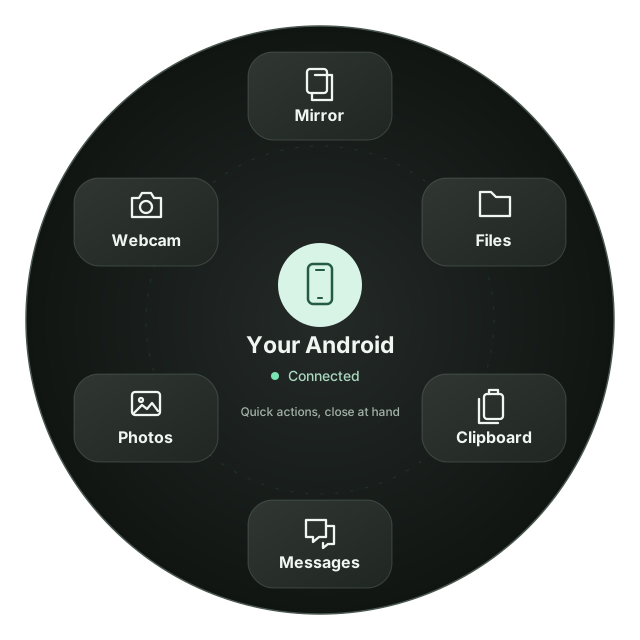
Reach Files, Photos, Messages, Clipboard, screen mirroring and webcam features from the ring instead of finding them in the main window.
Link Ring is an optional Mac feature, not a second connection service. Pair your Android first and keep LinkMyMac running. It does not add a Link Ring interface to Android or iPad.
Drop and send
From Finder to your phone.
Drag a file or folder from Finder. While holding the drag, use your configured Link Ring shortcut to open the ring, then drop onto the connected Android's send area.
Files use LinkMyMac's existing transfer connection. An item added to Transfers is queued, not necessarily delivered yet. Check Files → Transfers for completion or an error.
Collect files
Gather first. Send together.
Choose Collect files in Link Ring, then drop files from different Finder folders into the tray. When you are ready, choose Send to transfer them to the selected Android.
Collecting does not send anything. The tray is temporary and clears when you quit LinkMyMac. Removing an item or clearing the tray does not delete the original file.
Keep the originals available until the transfer finishes. The tray is not a backup or a permanent file store.
Clipboard picker
Keep the good bits close.
Choose Clipboard in Link Ring to search recent text, links and images. Copy an item explicitly, or pin a favourite to keep it handy on this Mac.
Opening the picker, searching or pinning does not copy or send an item. Normal clipboard-sync preferences apply when you choose Copy. Up to 10 favourites can be kept locally.
On Android 1.63, you can also save images directly from clipboard history. Read the clipboard guide.
Good to know
Your setup stays yours.
Link Ring is included in LinkMyMac 1.63 for Mac. It works with your active Android connection; no separate LinkMyMac account is required. If a shortcut is unavailable, use the View menu or choose another shortcut.
Screen mirroring, camera, messaging and other actions retain their own permission and compatibility requirements. Link Ring does not bypass those checks or enable automatic earbud switching.
See everything in version 1.63, explore the full feature guide, or get help.