LinkMyMac vs AndroMeld
Two ways to bring Android to your Mac. Here is what changes in setup, price and the things you do every day.
Choose the workflow, not the longest feature list.
LinkMyMac may suit you if...
You want everyday notifications, messages, files and clipboard tools without enabling Developer Options for basic pairing. You prefer an upfront purchase, a searchable clipboard shelf and quick actions through Link Ring.
Duo Mode is also useful if one Android phone needs to stay connected to two Macs. [1] [4]
Notifications, messages, files and clipboard through a direct local connection. No LinkMyMac account. No monthly subscription.
One-time Mac purchase. Both apps and a compatible Android device are required. Pair over reachable private local Wi-Fi or USB. Local prices vary.
What does each Mac app cost?
LinkMyMac
£14.99 one-time
Paid Mac download. Free Android companion. No required subscription or weekly purchase-plan allowances for transfers or mirror launches. There is no free Mac tier. [1]
Both prices are from the UK Mac App Store, checked 21 November 2026. Other countries and later prices may differ. The price shown by your store at purchase takes priority. Technical limits and device compatibility still apply to both apps.
The differences that matter in use.
| Workflow | LinkMyMac | AndroMeld |
|---|---|---|
| First setup | QR pairing for everyday features. Optional Advanced Mirroring requires USB Debugging or Wireless Debugging. [1] | USB setup uses Developer Options and debugging approval. Wireless debugging and Shizuku options are documented. [3] |
| Files | In-app Android storage and photo browsing, local transfers and Mac sharing. Does not mount Android as a Finder volume. [4] | Browse and manage Android storage in Finder, including Quick Look and drag-and-drop transfers. [2] |
| Mirroring and apps | Standard screen sharing; optional Advanced Mirroring includes individual Android app windows on supported devices. [1] | Phone Screen and separate Meld Mode app windows. Spotlight launch and desktop shortcuts. [2] |
| Messages and notifications | Direct SMS plus Google Messages and WhatsApp web options. Notification replies and actions depend on the phone app. Web providers have their own accounts and internet requirements. [4] | Use the phone's messaging app in a Mac window, plus synced notifications and supported notification replies. [3] |
| Clipboard | Text, links and supported images across devices. Mac history, search, favourites and the 1.64 shelf with an optional shortcut. [4] | Text and image clipboard sync. A comparable history-and-favourites shelf is not documented in the sources checked. [2] |
| Quick access | Menu bar controls and Link Ring (Beta): feature shortcuts, file drops, a temporary tray and clipboard picker. [5] | Spotlight, desktop app shortcuts, Android widgets and MCP phone control. [2] |
| Phone camera and microphone | Android camera as a Mac webcam; Android microphone as a Mac input. These are not cellular call audio. [4] | Phone-camera extension for Mac. The documented extension is video-only, without the phone microphone. [3] |
| Cellular calls | Supported call controls. Call audio and microphone remain on the phone, not the Mac. [4] | Call controls. Mac call audio depends on the phone's system support, not every phone is supported. [3] |
| Away from the local network | Local Wi-Fi or USB. No built-in internet relay or remote access across networks. [5] | Remote direct connection and an optional relay. Relay setup and data charges are separate from Mac Pro. [6] [3] |
| iPad and another Mac | Native iPad app, updated separately. Duo Mode supports one Android connected to two Macs; live features have one controlling Mac at a time. One active Android per Mac. [4] | Browser access is documented for iPad, Windows and Linux. An equivalent one-phone/two-Macs mode is not established by this comparison. [7] |
A closer look at LinkMyMac.
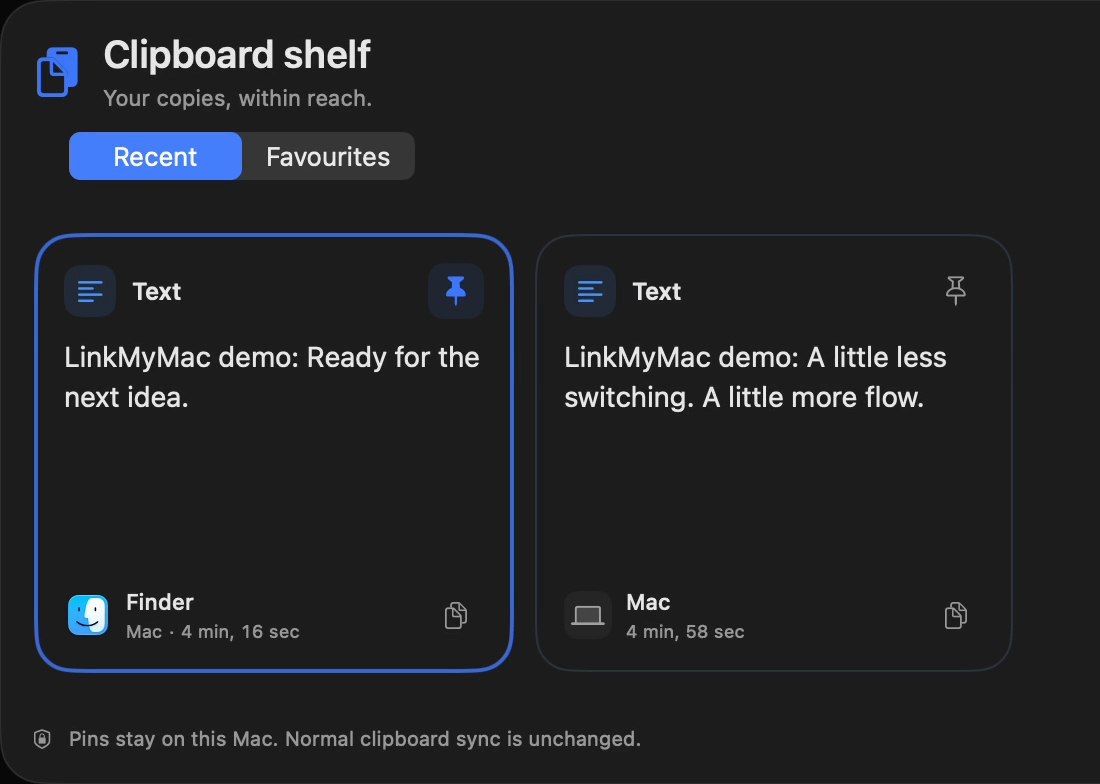
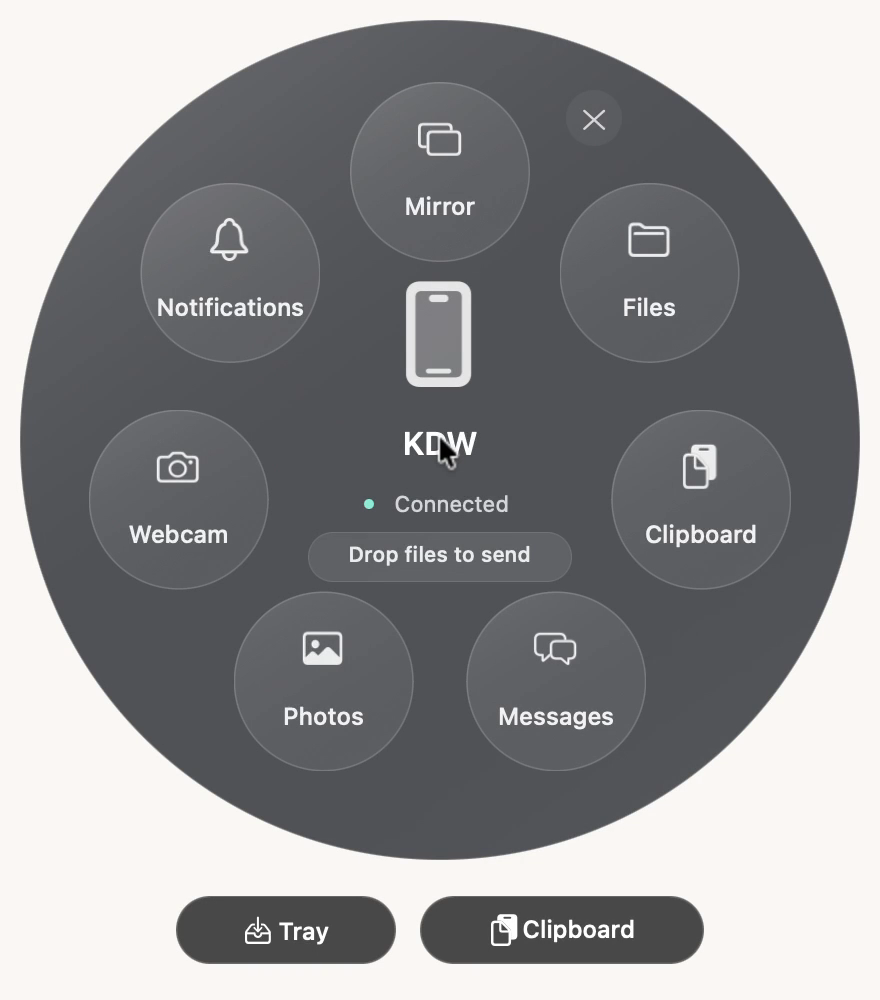
Real captures from our LinkMyMac 1.64 development build, showing features available in 1.64. The clipboard uses synthetic demonstration items. Images are cropped for readability, not reconstructed interfaces. No AndroMeld screenshots or performance claims are implied.
Check the parts that can change the answer.
Your Mac and phone
LinkMyMac's Mac listing requires macOS 15.5 or later. AndroMeld requires macOS 15 or later. Its Help Center documents Android 12+ for the USB baseline and 14+ for Meld Mode and web access, while its homepage lists Android 14+. Check the exact feature and your phone before relying on it. [1] [3] [7]
Privacy is not a one-app claim
Both document direct local connections without an account for local use. AndroMeld's optional hosted relay uses Google sign-in; its policy also documents a self-hosted option. LinkMyMac does not provide a remote relay. Optional Google Messages and WhatsApp in LinkMyMac are separate online services, not local message transports. [6] [8] [4]
Permissions and compatibility
Notification actions depend on the originating app. Android restricts some clipboard and protected-screen access. Debugging-based features need extra setup. Neither a feature list nor this page guarantees every phone, app or managed network will behave identically. AndroMeld's free tier is a useful way to check its fit before buying Pro. [3] [5]
Sources you can check yourself.
These are the publishers' own claims and store disclosures, checked on 21 November 2026. They are not an independent security audit or a device-by-device compatibility test. No star scores, performance rankings or unannounced features are used here.
- LinkMyMac, UK App StorePrice, Mac release, compatibility, Advanced Mirroring and Duo Mode.
- AndroMeld, UK Mac App StoreFree download, Pro prices, version and Finder/app integrations.
- AndroMeld Help CenterSetup, allowances, camera/microphone, calls and remote access.
- LinkMyMac feature guideClipboard shelf, Link Ring, files, camera and microphone.
- LinkMyMac FAQ1.64 release, optional features, permissions and limitations.
- AndroMeld Mac privacy policyLocal connections, remote signaling and optional relay setup.
- AndroMeld product pageBrowser availability and the published Android requirement.
- LinkMyMac privacy policyDirect device communication and feature permissions.
Found something that changed? Send a correction with the official source. AndroMeld is a separate product by Catching Now. Product names belong to their respective owners; no endorsement or affiliation is implied.
Make Android feel at home on your Mac.
If LinkMyMac fits your workflow, start with the Mac app and free Android companion. If Finder integration or remote access is essential, review AndroMeld's current offering too.
One-time Mac purchase, no monthly subscription. Requires a compatible Android device and the free companion. Check setup or ask a question before buying.
Also comparing Windows Phone Link? Read Phone Link alternatives for Mac.